Navigation
All sites have at least two navigation areas: The Header Menu and the Footer Menu. The Header and Footer menus appear on all pages of the website. Some sites also include a Secondary Menu, generally included in the Sidebar or Body.
Header Menu
The Header Menu is a set of links in the Header used to navigate the site.
Only the Top-Level pages are immediately visible, but subpage links can be viewed by hovering over a menu item.

On touch screen devices, the subpage links can be viewed by tapping on the top-level item. An icon will appear next to the subpage menu so that the user can close the menu. Tapping on the top-level item once the subpage is open will bring the user to the top-level page.

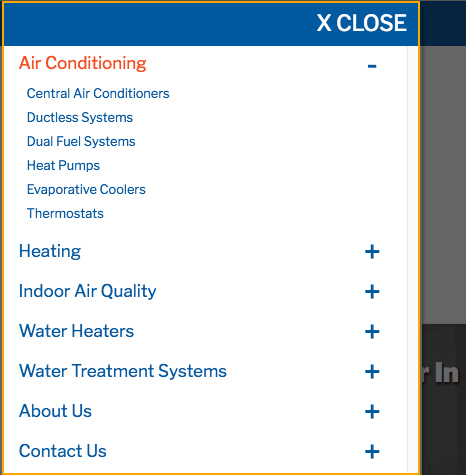
On mobile devices, the Header Menu will be hidden, and a menu icon will display. Tapping the menu icon will open the Header Menu. Again, only the top-level links are immediately visible. Tapping on the corresponding plus (+) sign will display the subpage links.

Footer Menu
The Footer Menu displays in the footer of the site across all pages. Only top-level links are visible, and (except in the case of older iMarket sites), there are no subpage links.

Secondary Menu
Some site designs include a secondary menu on subpages. This menu is made up of links to secondary and/or tertiary pages from a particular sitemap section. The Secondary Menu is available as a means to navigate the site in addition to the Header and Footer Menus, and is generally located in the Sidebar or Body. All links in the Secondary Menu are visible when the page loads.

Best Practices
Non-Development users should not publish new top-level resources to the header or footer navigation without opening a ticket to Development first.
Before creating any resources, first determine if this is a top-level page (i.e., it is not a child of another page). If this is the case, you may create the page but must leave it unpublished. Open a ticket to Development requesting that they revise the Header Menu to account for the additional item, and that they publish the page once it’s complete. Otherwise, adding another page to the top-level will likely result in a broken Header Menu, as illustrated below:


Last updated: